Video
Here is the tutorial video if you would like to follow the guide step by step.
Introduction
Has it ever happened to you that you missed an alarm because you turned it off and went back to sleep? Would you like to start your coffee machine at the right time, based on your wake-up alarm? With this tutorial, you will be able to send multiple alarms to Home Assistant to automatically trigger different actions. The goal of this tutorial is simply to create your alarms on your iPhone/iPad and let the rest happen automatically.
Prerequisites
To follow this tutorial, you will need an iOS device (iPhone, iPad) with the Shortcuts app installed. In my case, my devices are running iOS 26.2. You will also need Home Assistant (my version is 2026.2.2) and Node-RED (my version is 21.0.0).
Please also note that an internet connection is required to automatically send the alarms to Home Assistant.
How It Works
Before creating the shortcut, let’s take a moment to understand how it works. I have prepared a very simple diagram to illustrate the different steps.
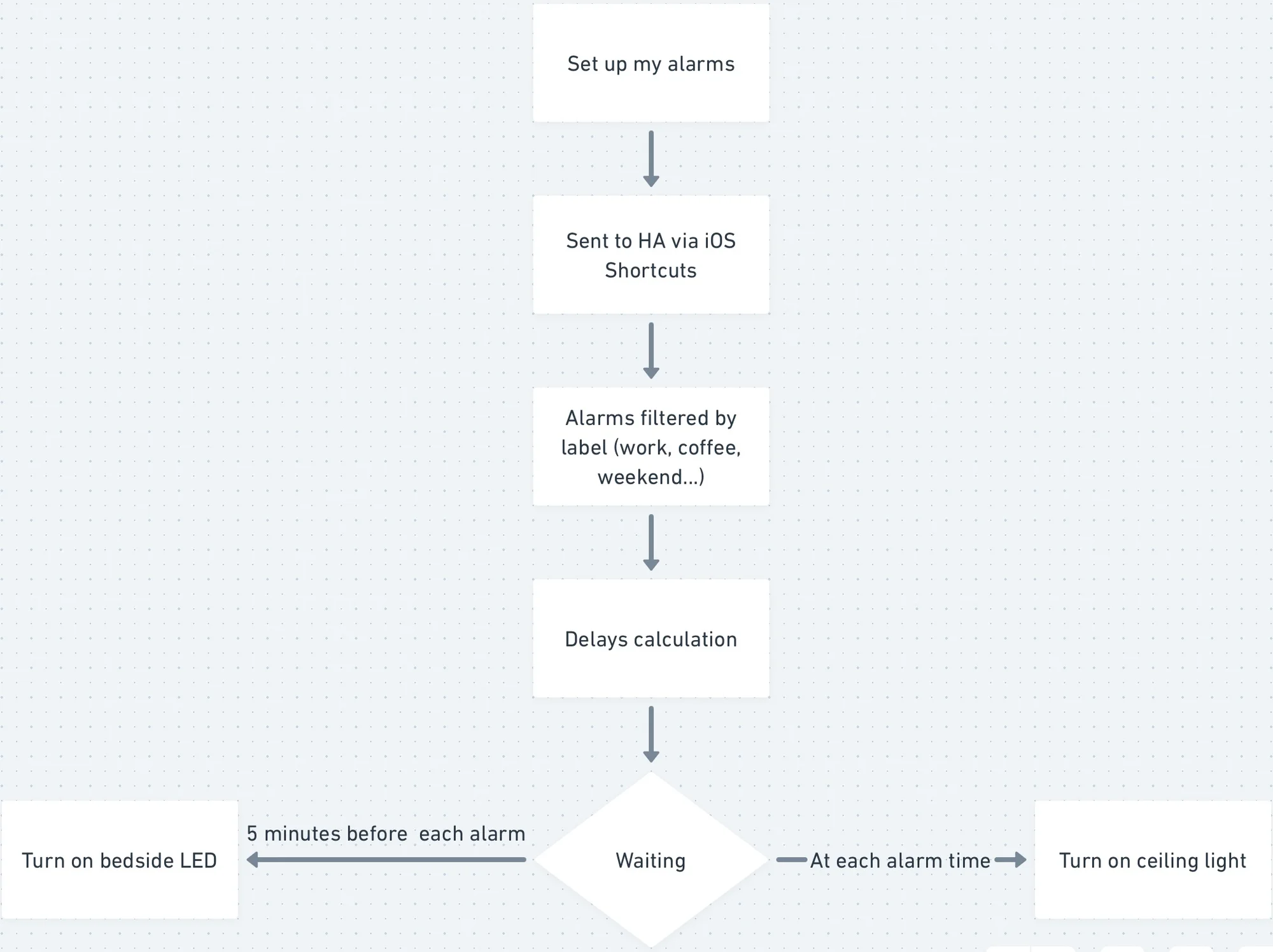
Our scenario starts with setting up our alarms. You can create as many as you want.
Then, through the iOS Shortcuts app, all your alarms will automatically be sent to Home Assistant using the call-service actions, which are available as soon as the Home Assistant app is installed.
After that, in Node-RED (within Home Assistant), the alarms will be filtered based on what is written in the description (or label). For each alarm, we will calculate the delay between the moment it is received in Node-RED and its activation time.
Once all delays are calculated, at the activation time of each alarm, we will first turn on an LED strip five minutes before the alarm. It will gradually increase to its maximum brightness over five minutes. This way, when the alarm goes off, the LED light will already be at maximum brightness in addition to the alarm sound. At the same time, we will also start turning on the ceiling light progressively over five minutes.
With both the alarm sound and the two lights, it will be hard not to get up 😊. Personally, I usually wake up when the LED strip starts turning on, and I enjoy this gentle wake-up because I placed the LED strip at the foot of my bed.
Creating the Shortcut
First, create new alarms.
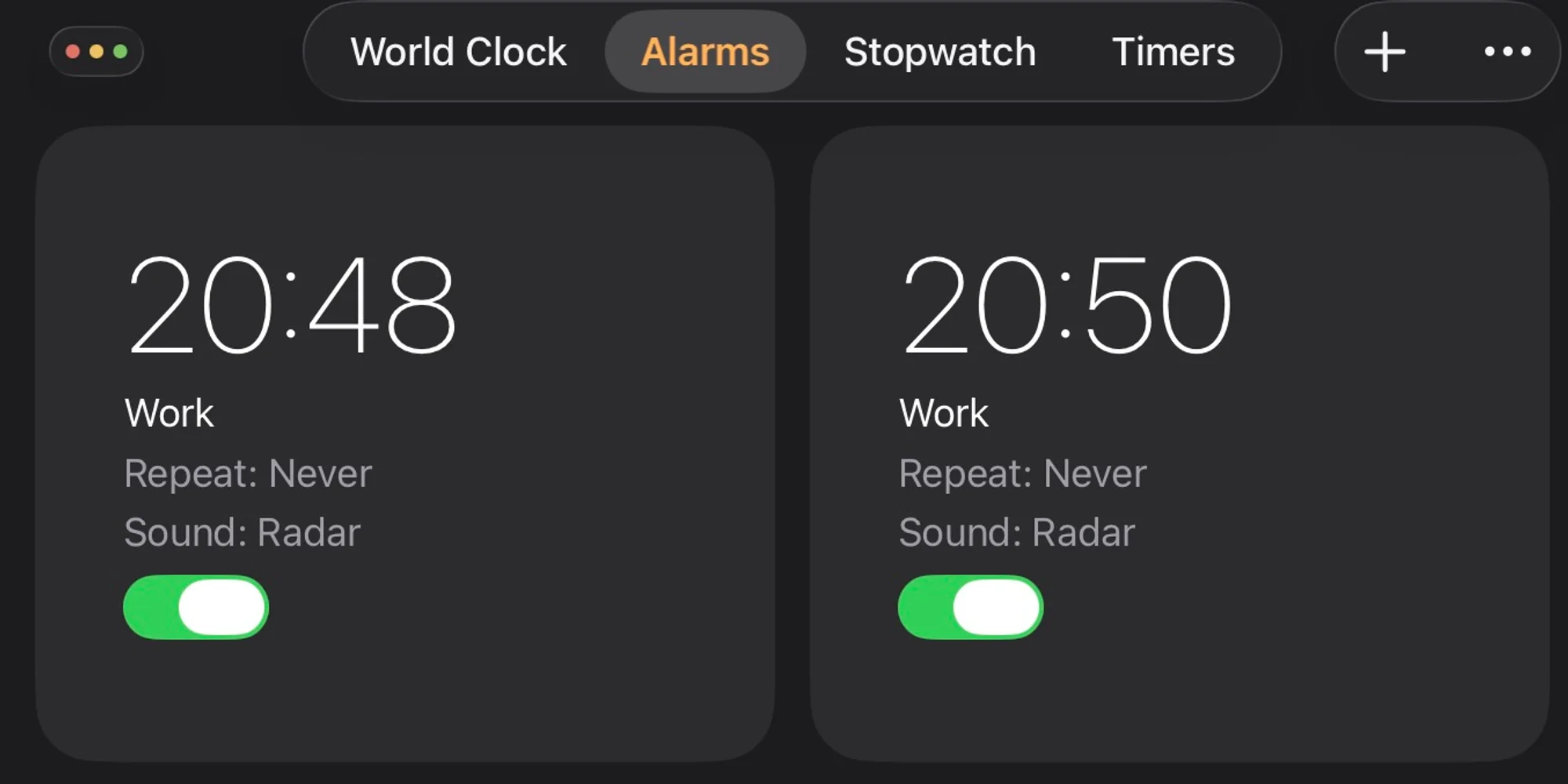
Make sure to choose a label.
In the Shortcuts app, the first action will be to retrieve all alarms. In our case, we will directly filter them in the action to include only the ones that are enabled.
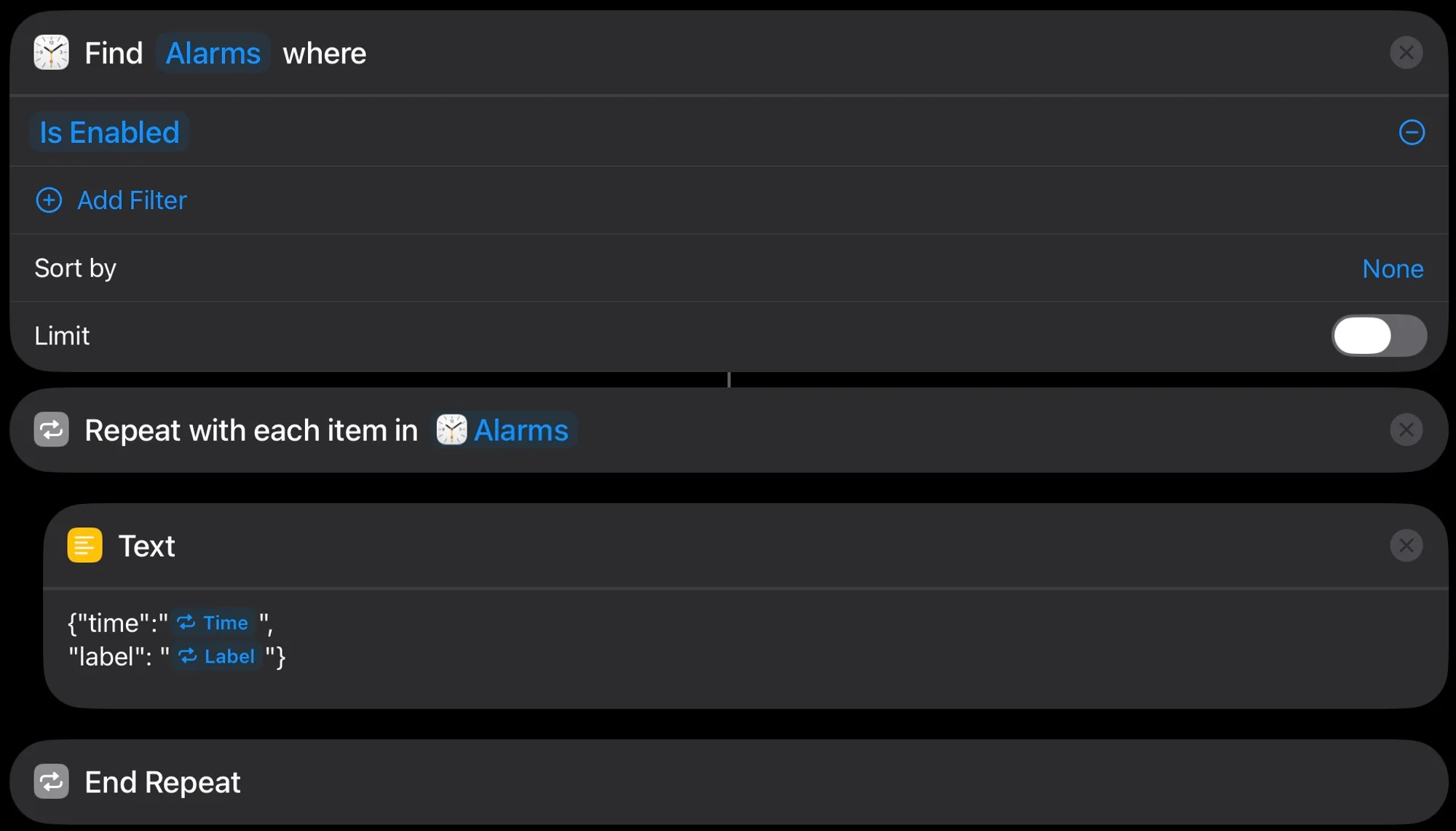
Once this step is completed, we will create a loop to process each alarm among all the alarms found. Inside the loop, we will place the alarm time and its description into a text block. For the “time” item, you can select the following option:
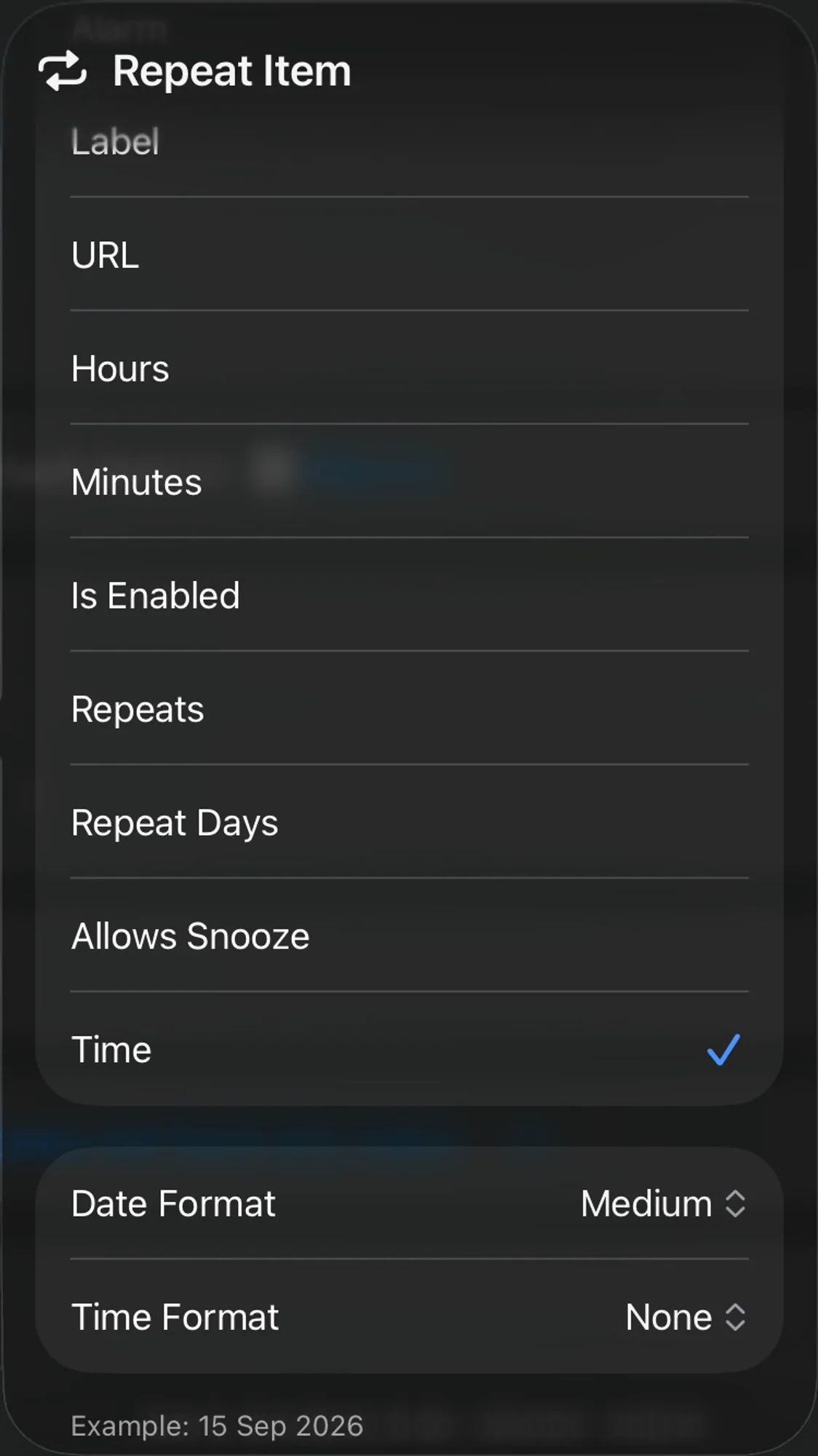
It is very important in this part to follow exactly what I did to avoid formatting issues. Indeed, we will send data to Home Assistant in JSON format, so the structure must be strictly respected.
After the loop, we first handle the case where the text is empty (no active alarms).
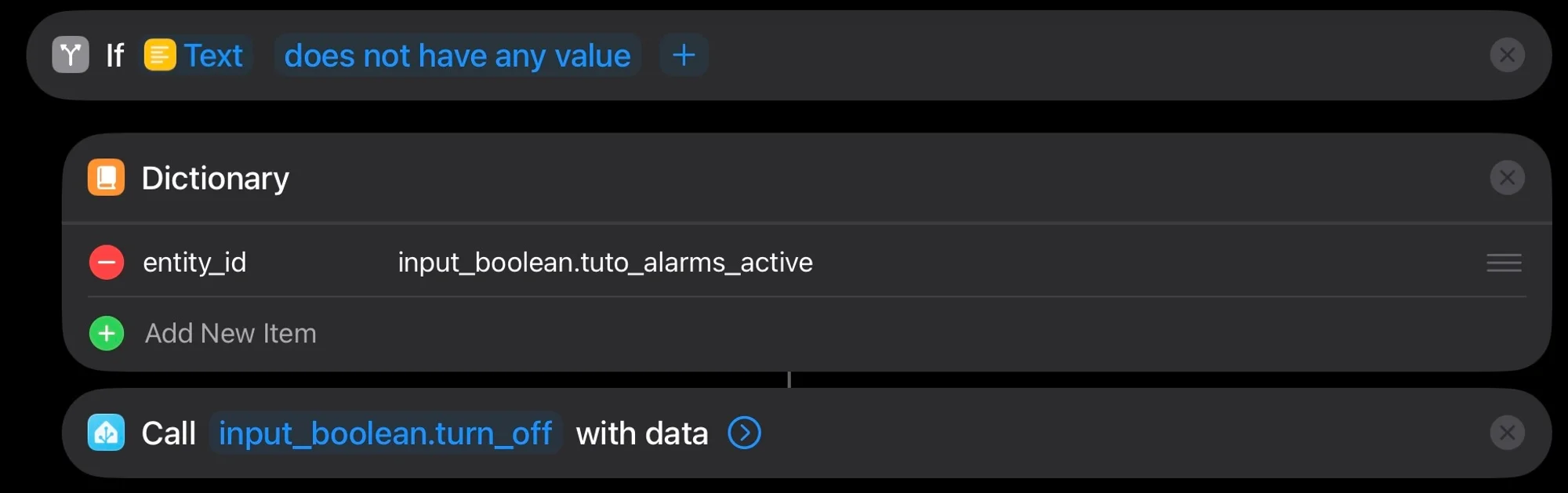
In this case, we will send a Boolean to Home Assistant to disable the automation and prevent it from triggering. Here again, it is very important to send dictionaries because the data contained in dictionaries will automatically be converted into the correct format (JSON) by the Shortcuts app. I did not use dictionaries inside the loop because they do not behave as expected there.
Since we are sending a Boolean, we will use the call service “input_boolean_turn_off” to disable the Boolean. You can choose any name you want for your variable, but it must start with “input_boolean”.
Next, we handle the case where there are active alarms.
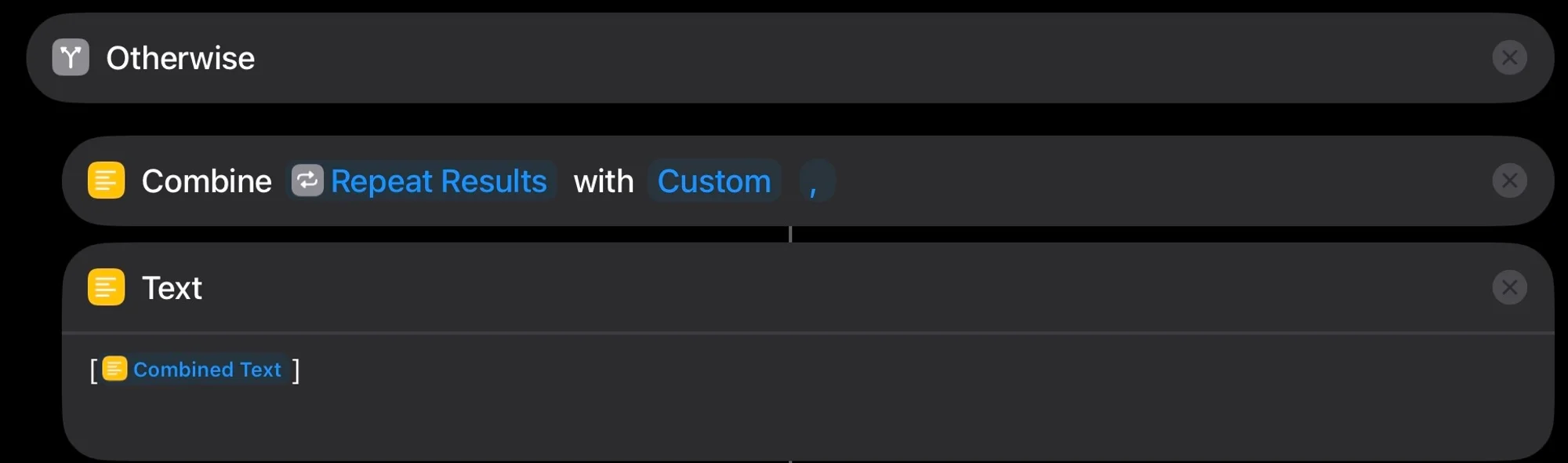
In this case, we will combine all the alarms found so they are sent only once. To do this, use the combine text action, select “custom” as the option, and add a comma as a separator. This way, all alarms will be combined with commas between them. At the end, we will take the result (all combined alarms) and wrap it in square brackets (again, to avoid formatting issues). We can now send the result to Home Assistant using a dictionary.
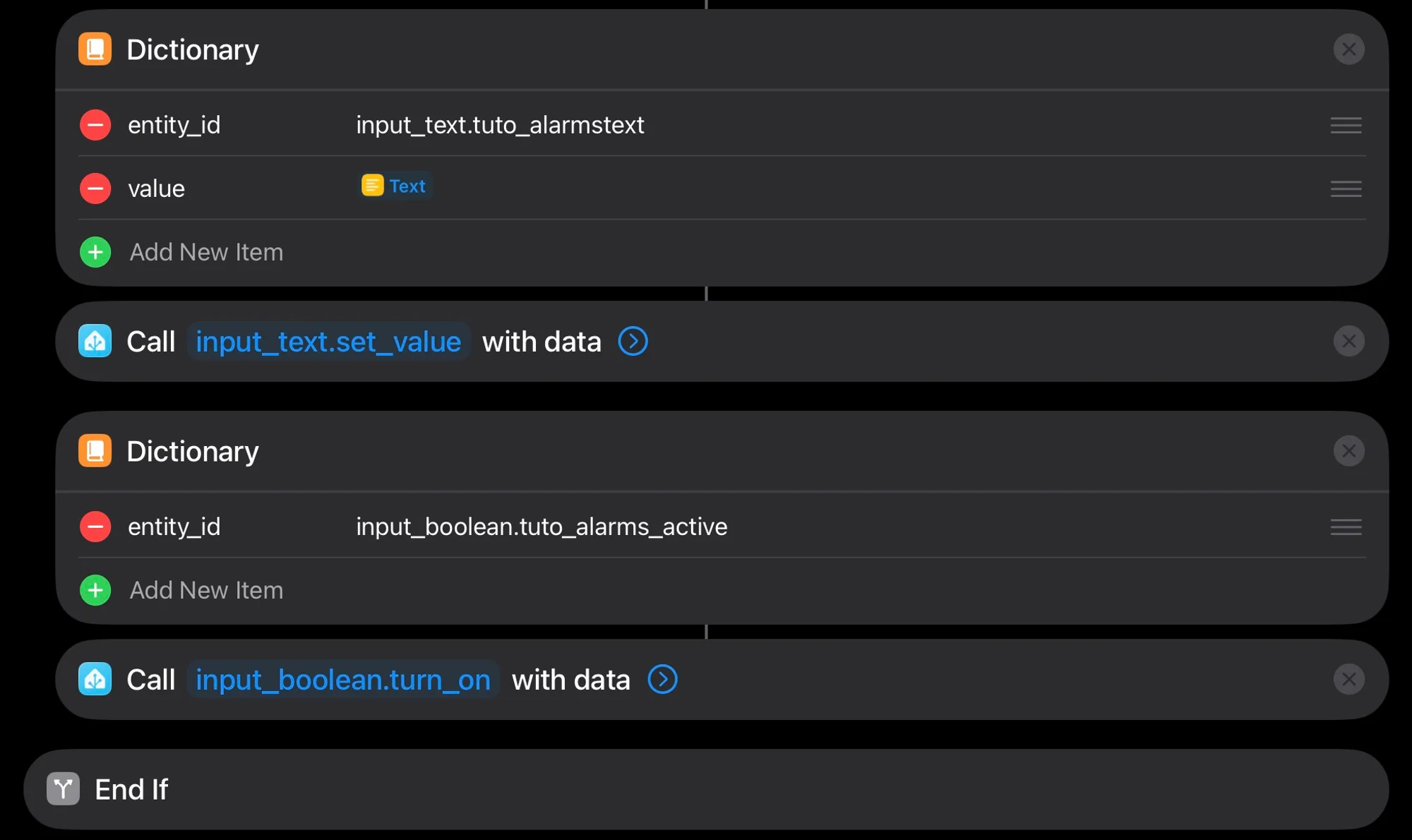
In this case, we are sending text, so we must use the call service “input_text.value”. Here as well, the variable name you choose must start with “input_text”. Once this step is completed, we only need to turn the Boolean back on using the action “input_boolean.turn_on”.
Now we are done with the Shortcuts part. Let’s move on to the automation part to automatically send the alarms.
Automating Alarm Sending
In this part, you simply need to create a new automation so that every time you close the Clock app, the alarms are automatically sent to Home Assistant.
To do this, in the action section, choose to run the shortcut we just created.
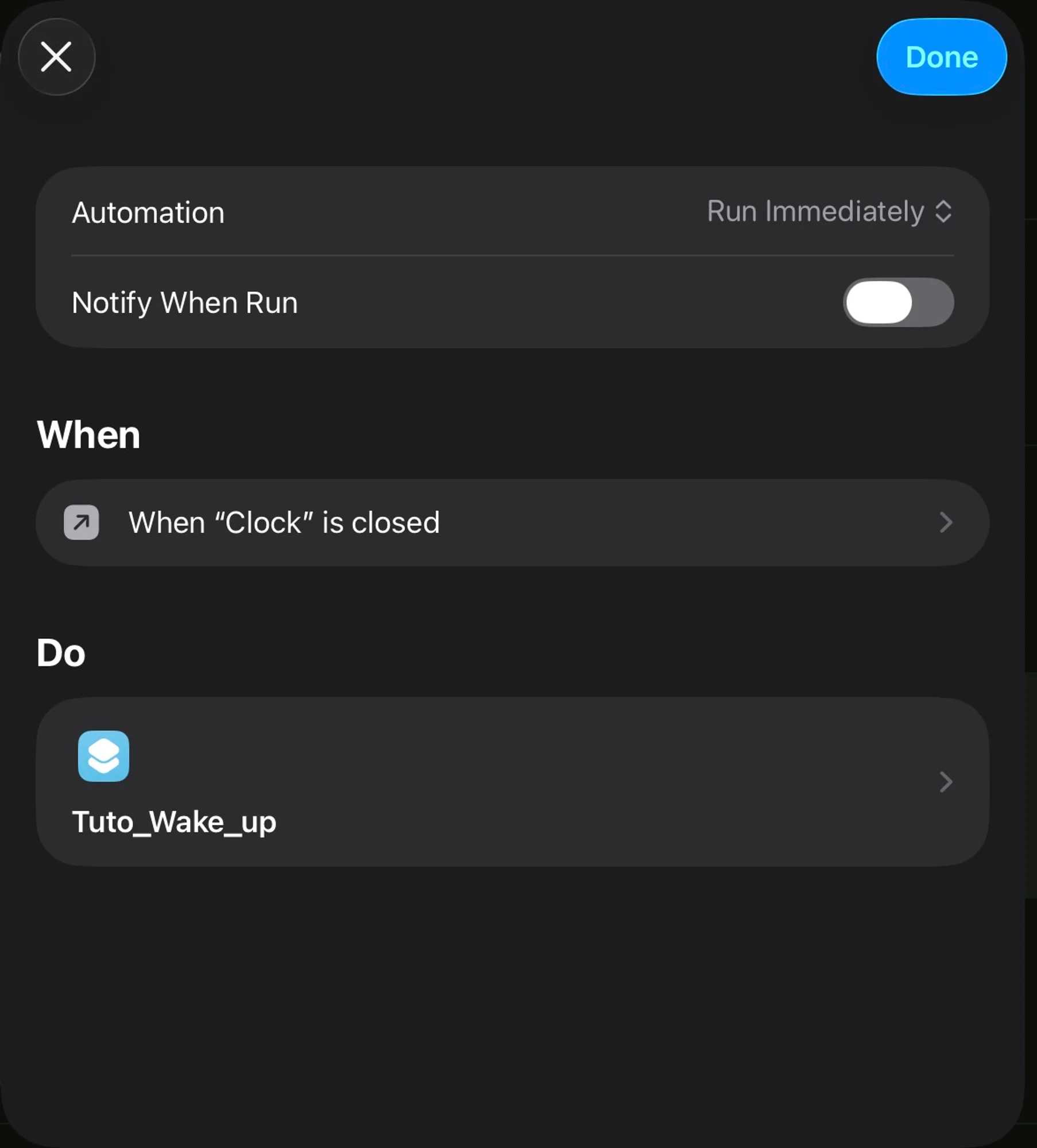
We have now completed the first step of sending the alarms.
Configuration in Home Assistant
Before creating our automation in Home Assistant, we will first configure everything to ensure the data is properly received in the correct format.
In my Home Assistant setup, I use Visual Studio, but this part should work with any text editor. The configuration.yaml file centralizes all configuration files.
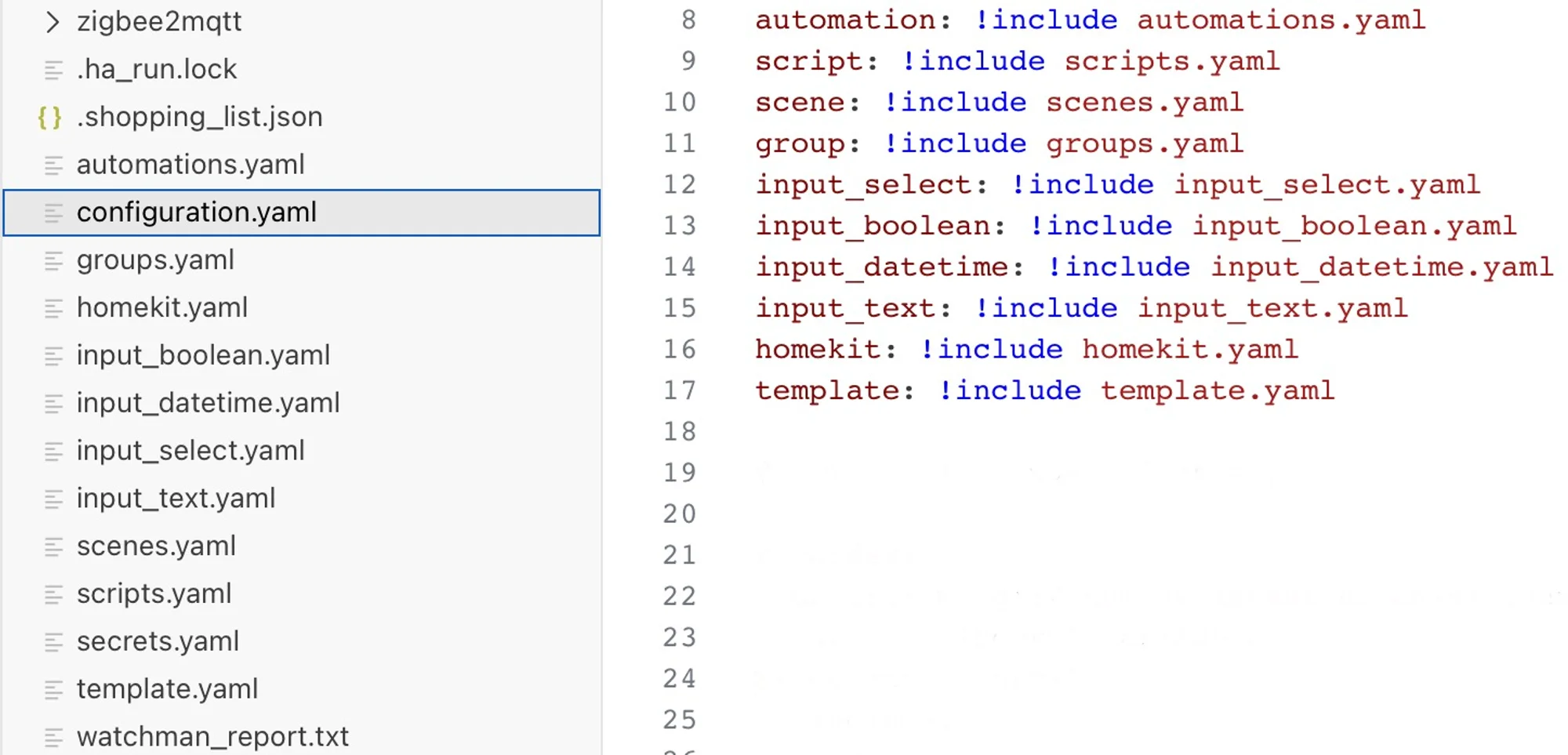
In our case, we will modify the input_boolean.yaml, input_text.yaml, and template.yaml files. We modify the first two files because in the shortcut we used “input_boolean” and “input_text”.
For “input_boolean”, you must use the same name as in the shortcut:

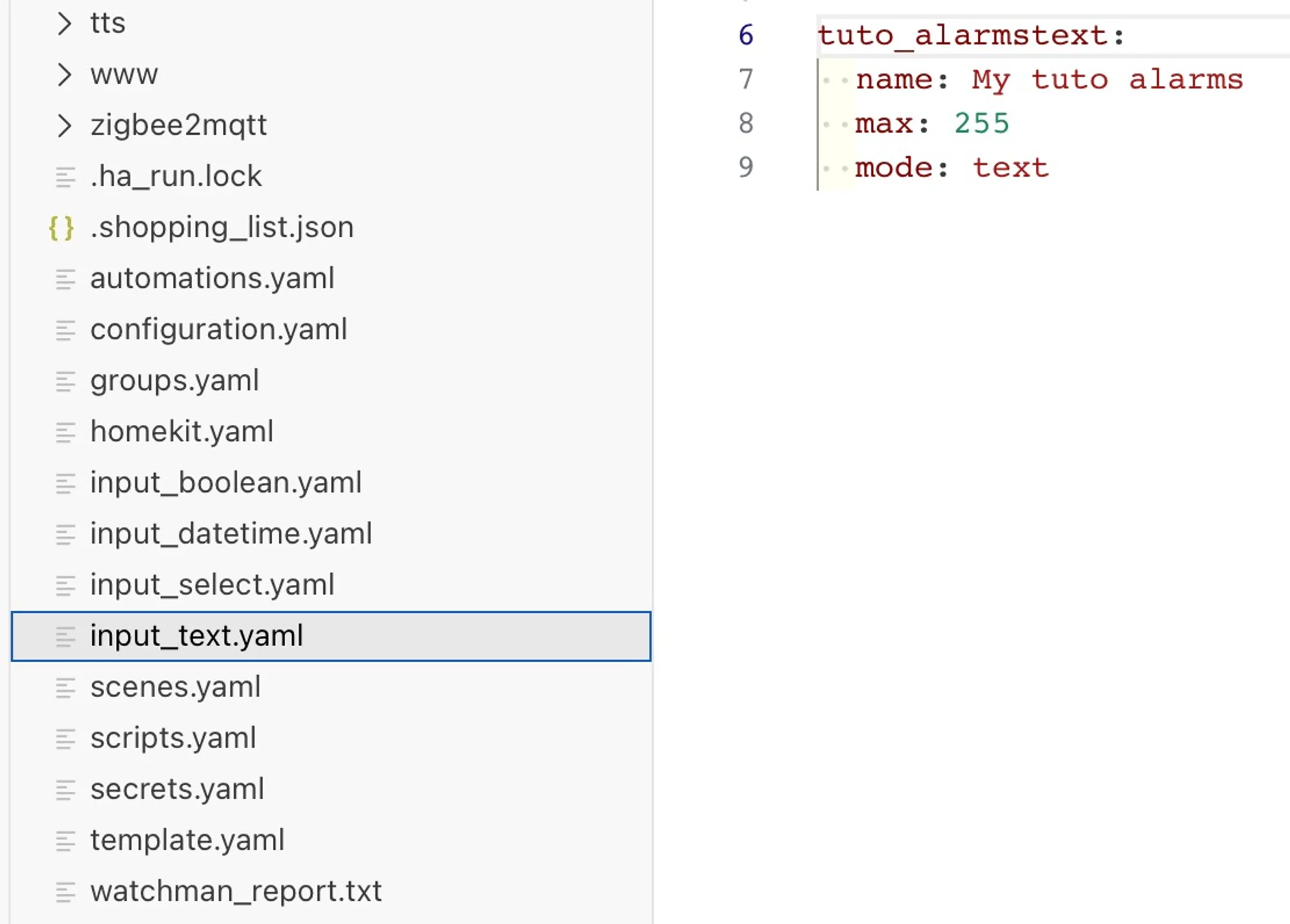
For “input_text”, you must also use the same name as in the shortcut and specify a maximum length of 255 characters and text mode.
Finally, we will create a sensor in template.yaml, which we will format for use in Node-RED.
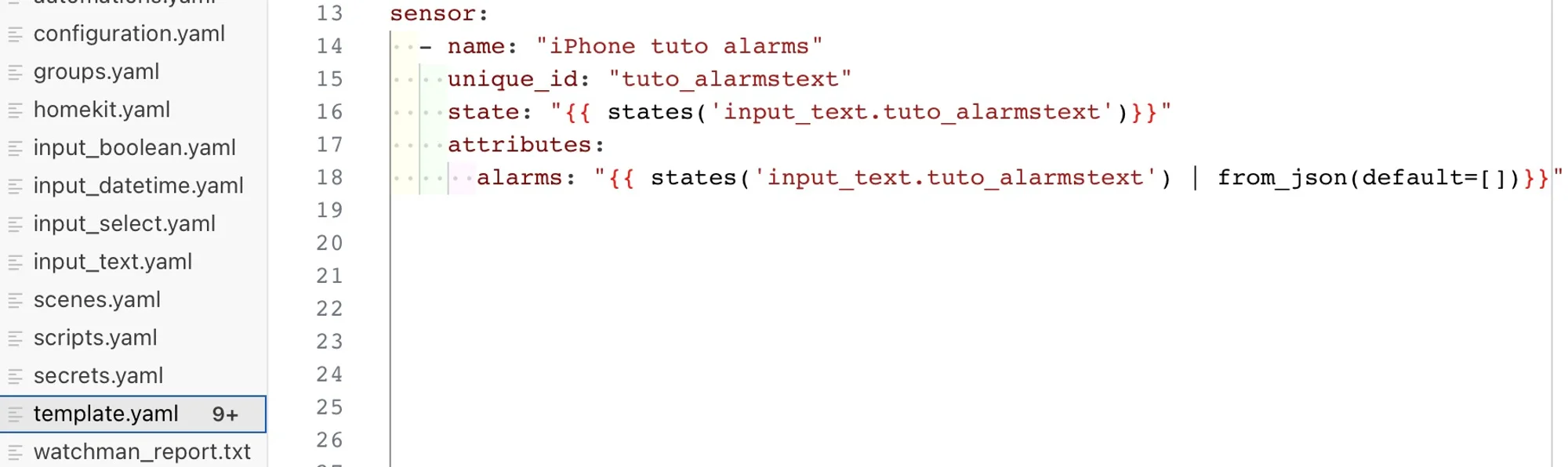
We will add a state to our sensor that takes the raw value of the input_text sent by the shortcut, and more importantly, we will add an attribute so that in case of formatting issues, an empty JSON array is sent.
After reloading the configurations, you can test whether your variables are properly received in Home Assistant by creating alarms in the Clock app and checking that the values appear correctly in Home Assistant.
Creating the Automation
For this automation, we will use only simple Node-RED blocks.
First, we check the state of the Boolean.

When it is active, we use a current_state node to retrieve the alarms (using the sensor we previously created). Once retrieved, we create a function that will calculate the delays and send them in the correct format to the delay nodes.
 Delay Calculation
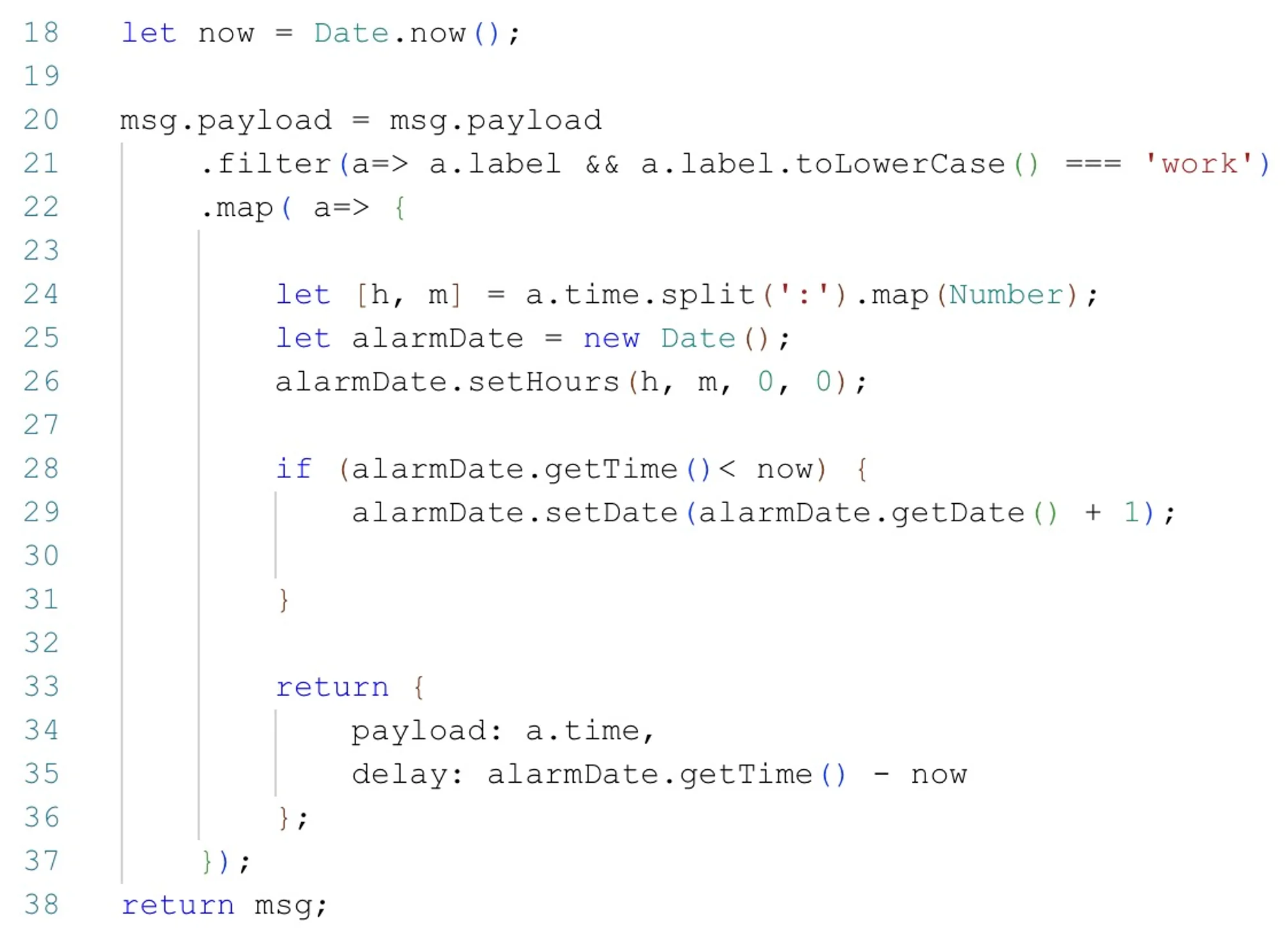
Inside the function, we first check whether there is a description (normally all alarms have a description even if you did not fill it in: by default, it is “alarm”). After that, we simply create an array of alarms containing the alarm time and its delay before execution. If the calculated delay is negative (when the alarm time is earlier than the current time), it means the alarm is scheduled for the next day.
The next piece of code ensures that the input data of the function node is in the correct format.
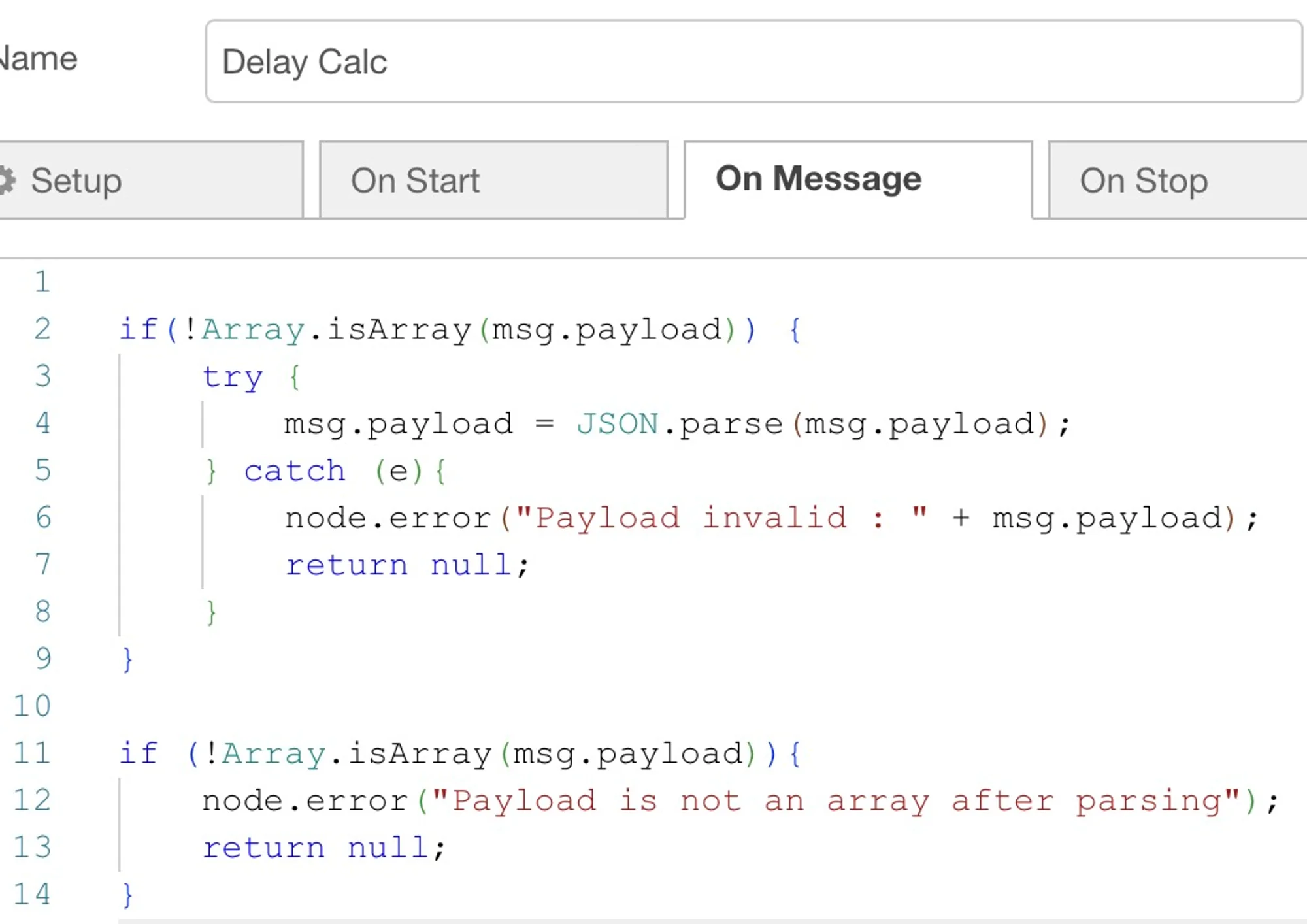
This is also an extra safeguard to avoid formatting issues (I encountered many while creating this tutorial).
SplitAfter this function, we insert a split node to separate each alarm. Without it, the delay node could handle only one alarm at a time. However, after this split node, the message sent is no longer in the correct format. We therefore need to create another function just for formatting.
Formatting Messages After the Split Node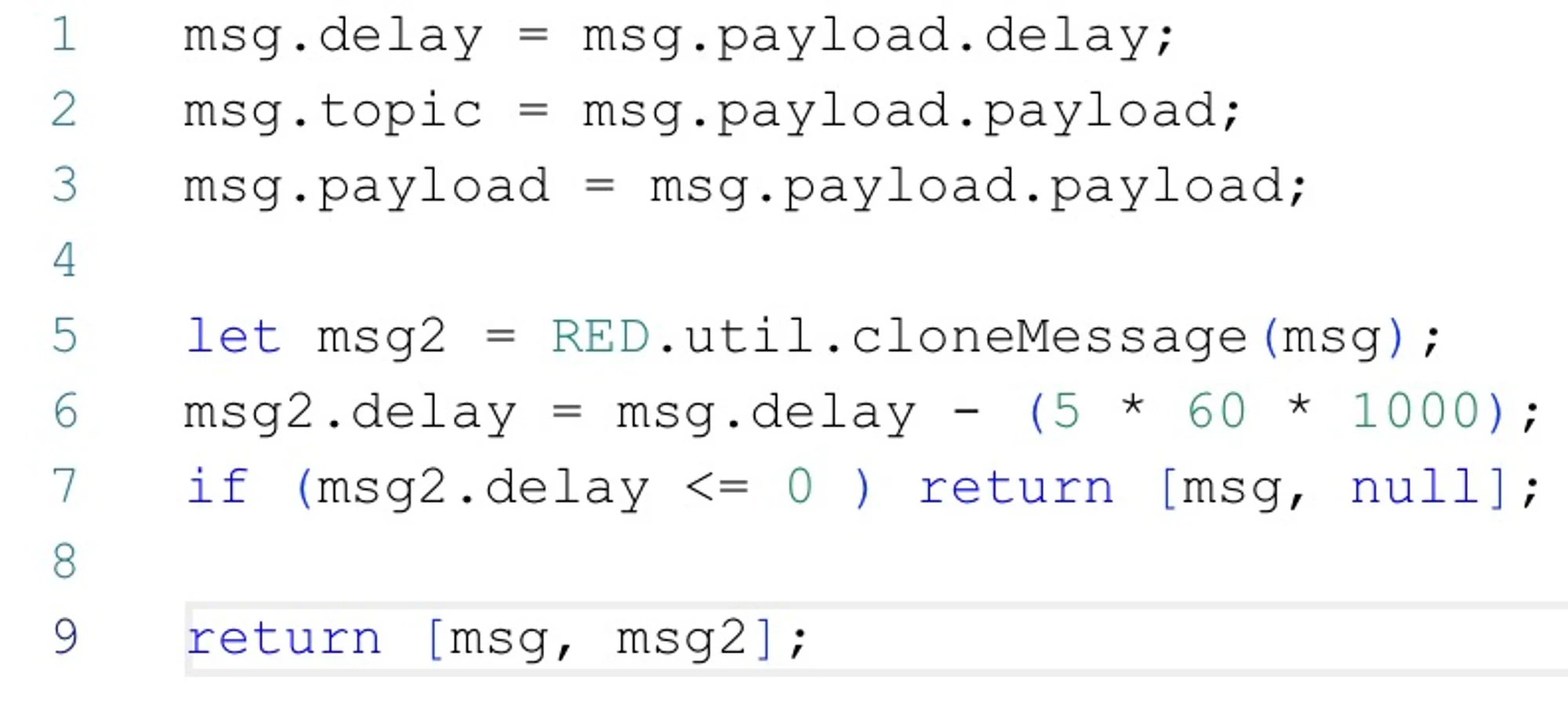
In this function, we simply copy the messages and put them into the correct format expected by the delay node. We will also create a second output for activating the LED strip 5 minutes before the alarm. This second output will therefore be a copy of the first one minus 5 minutes. If the delay of the second output is zero (meaning the alarm will trigger in less than 5 minutes), we will not send anything.
Delay Node Configuration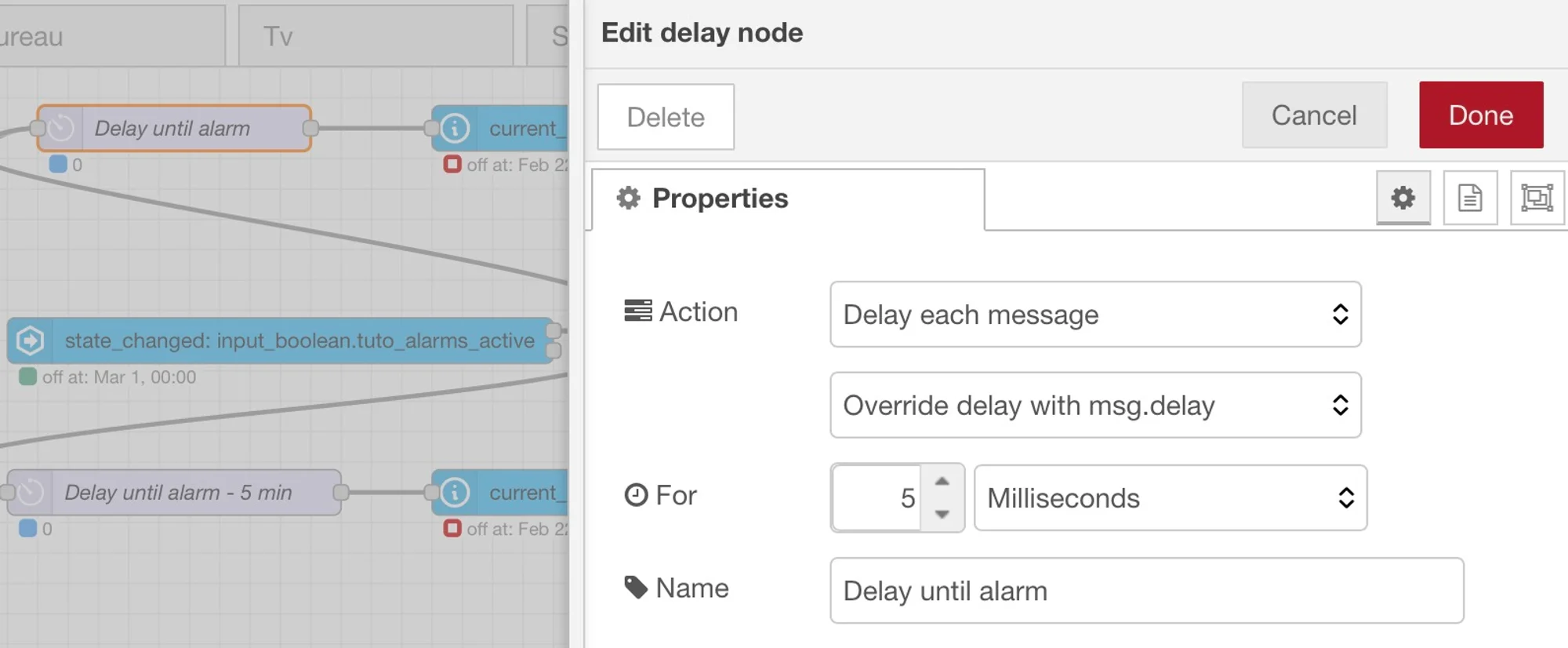
In the delay node, you just need to replace the delay value with msg.delay (the delay calculated earlier).
Actions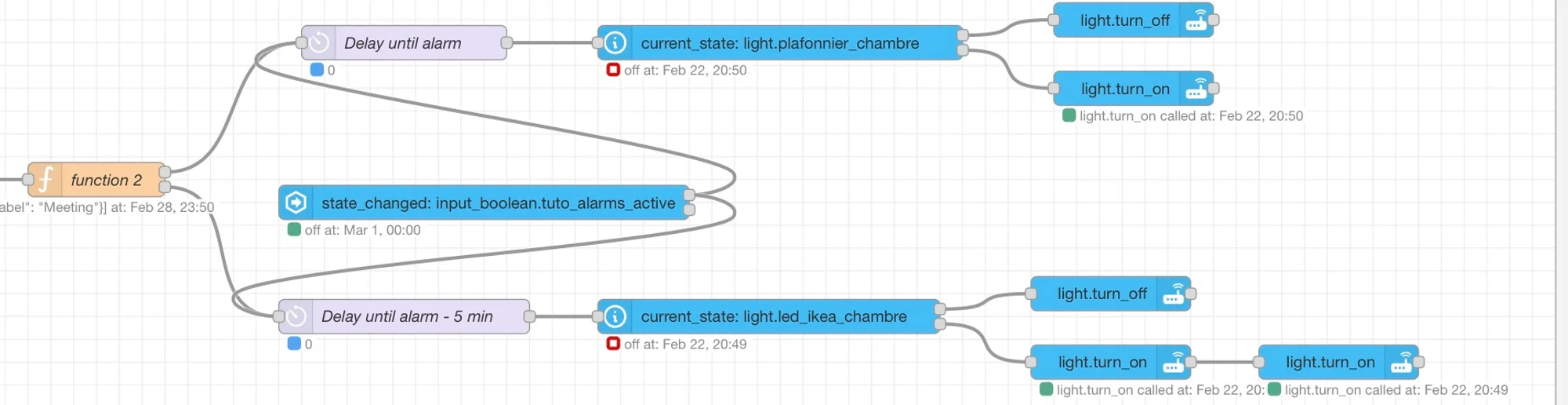
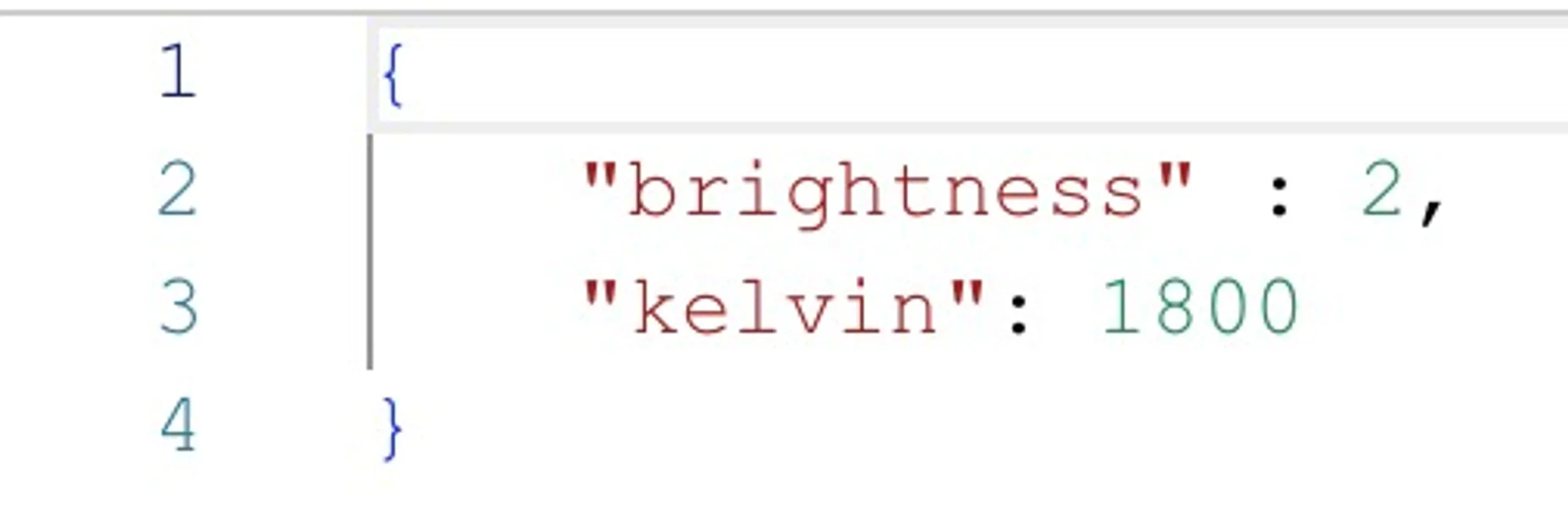
Regarding the actions, I chose to turn off the lights if they were already on. Of course, you can choose a different scenario depending on your use case. For the LED strip, I use an IKEA model. To make it turn on progressively, I need to use two action nodes

In the first one, set the starting brightness (minimum value in my case) with a color temperature of 1800 Kelvin (a sunrise-like hue, gentle for waking up.
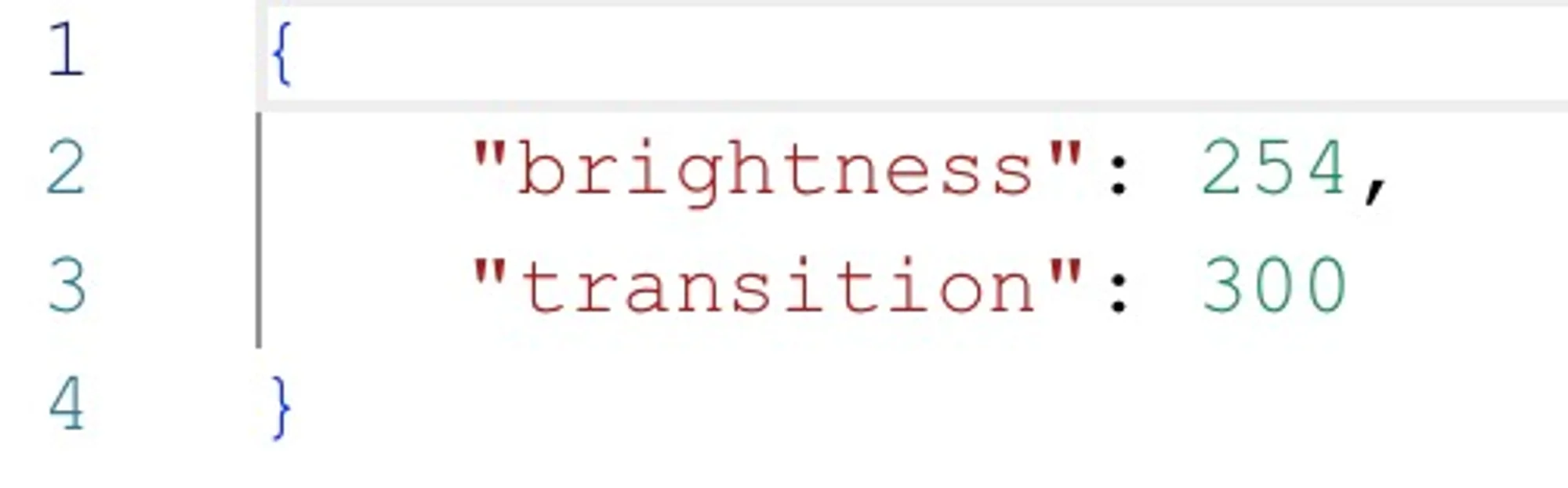
In the second node, set the final brightness (maximum value in my case) as well as the transition duration in seconds.
For the ceiling light, there is no need for two nodes.
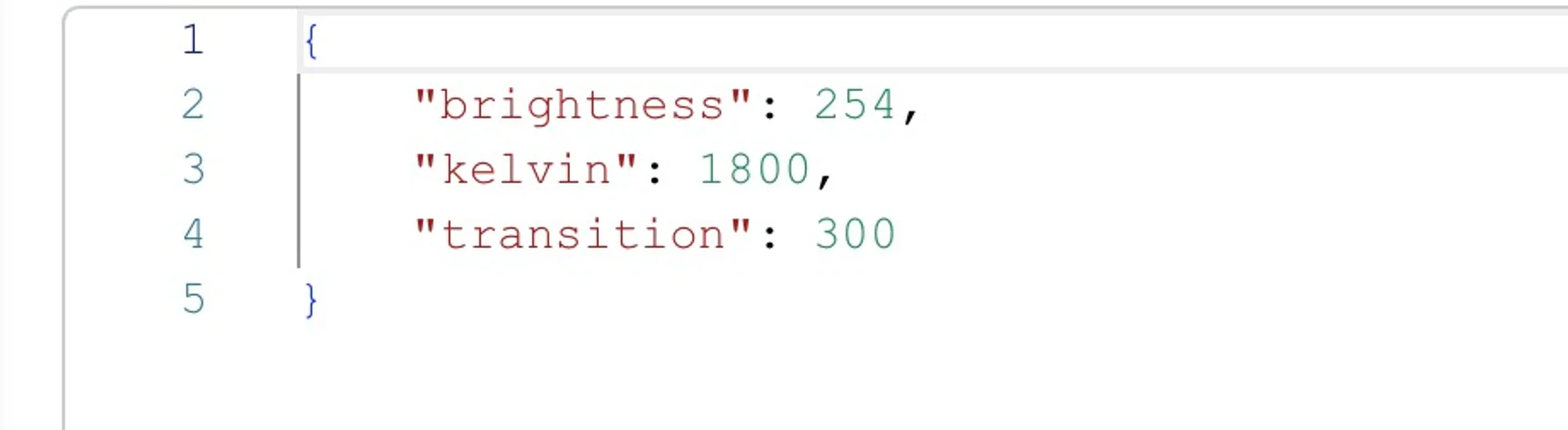
Only one is required, setting the maximum brightness and the desired transition.
ResetFinally, you will need to reset the alarms when no alarm is active.
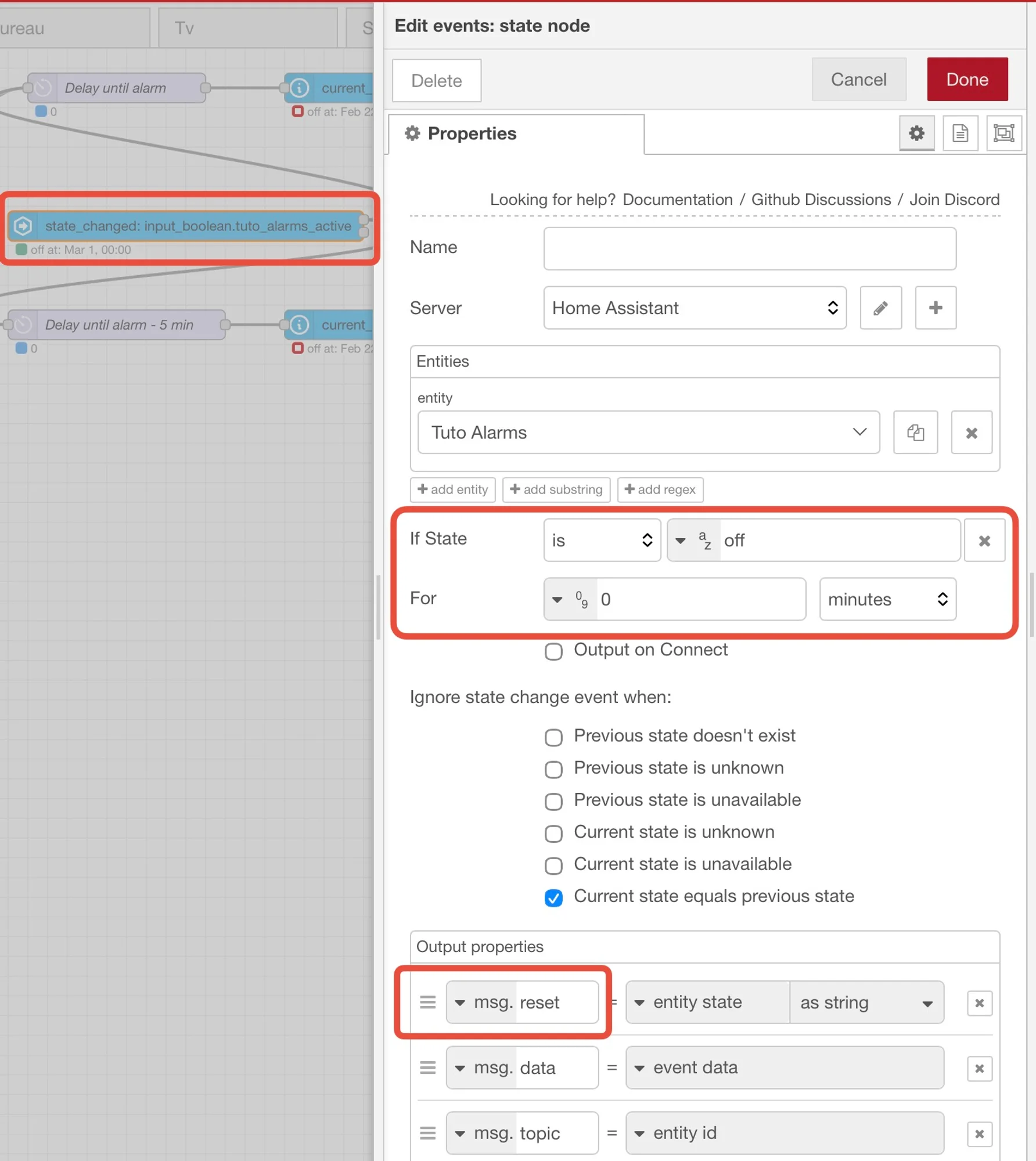
We will therefore send a reset message to the delay nodes when no alarm is active.
If, for example, you create a new alarm, you will first need to disable all alarms and send them to Home Assistant to perform the reset. Once that is done, you can create your alarms and send them again to Home Assistant.
Now we are done with the coding. If you want to create different types of alarms, you only need to change the descriptions and take them into account in the delay calculation function. Once everything is set up, you do not need to do anything else: simply create your alarms on your phone and let the automation handle the rest.
Downloads
You will also find the shortcut link here: https://www.icloud.com/shortcuts/d679783c546d4c16b584e014ab7b7e62
You can import the Node-Red flow:
[
  {
    "id": "f9c814eb00e4931b",
    "type": "tab",
    "label": "Tuto",
    "disabled": false,
    "info": "",
    "env": []
  },
  {
    "id": "baebc8ef450c9cda",
    "type": "server-state-changed",
    "z": "f9c814eb00e4931b",
    "name": "",
    "server": "4e2c03c1.d491cc",
    "version": 6,
    "outputs": 2,
    "exposeAsEntityConfig": "",
    "entities": {
      "entity": [
        "input_boolean.tuto_alarms_active"
      ],
      "substring": [],
      "regex": []
    },
    "outputInitially": false,
    "stateType": "str",
    "ifState": "on",
    "ifStateType": "str",
    "ifStateOperator": "is",
    "outputOnlyOnStateChange": true,
    "for": "0",
    "forType": "num",
    "forUnits": "minutes",
    "ignorePrevStateNull": false,
    "ignorePrevStateUnknown": false,
    "ignorePrevStateUnavailable": false,
    "ignoreCurrentStateUnknown": false,
    "ignoreCurrentStateUnavailable": false,
    "outputProperties": [
      {
        "property": "payload",
        "propertyType": "msg",
        "value": "string",
        "valueType": "entityState"
      },
      {
        "property": "data",
        "propertyType": "msg",
        "value": "",
        "valueType": "eventData"
      },
      {
        "property": "topic",
        "propertyType": "msg",
        "value": "",
        "valueType": "triggerId"
      }
    ],
    "x": 200,
    "y": 160,
    "wires": [
      [
        "c66b6f9764cbf10f"
      ],
      []
    ]
  },
  {
    "id": "c66b6f9764cbf10f",
    "type": "api-current-state",
    "z": "f9c814eb00e4931b",
    "name": "",
    "server": "4e2c03c1.d491cc",
    "version": 3,
    "outputs": 1,
    "halt_if": "",
    "halt_if_type": "str",
    "halt_if_compare": "is",
    "entity_id": "sensor.iphone_tuto_alarms",
    "state_type": "str",
    "blockInputOverrides": true,
    "outputProperties": [
      {
        "property": "payload",
        "propertyType": "msg",
        "value": "string",
        "valueType": "entityState"
      },
      {
        "property": "data",
        "propertyType": "msg",
        "value": "",
        "valueType": "entity"
      }
    ],
    "for": "0",
    "forType": "num",
    "forUnits": "minutes",
    "override_topic": false,
    "state_location": "payload",
    "override_payload": "msg",
    "entity_location": "data",
    "override_data": "msg",
    "x": 640,
    "y": 160,
    "wires": [
      [
        "c670ef7b7cd52d9a"
      ]
    ]
  },
  {
    "id": "5022d443bef38707",
    "type": "split",
    "z": "f9c814eb00e4931b",
    "name": "",
    "splt": "\\n",
    "spltType": "str",
    "arraySplt": 1,
    "arraySpltType": "len",
    "stream": false,
    "addname": "",
    "property": "payload",
    "x": 1070,
    "y": 160,
    "wires": [
      [
        "58887052eaa93e98"
      ]
    ]
  },
  {
    "id": "5527043f8bd23726",
    "type": "delay",
    "z": "f9c814eb00e4931b",
    "name": "Delay until alarm",
    "pauseType": "delayv",
    "timeout": "5",
    "timeoutUnits": "milliseconds",
    "rate": "1",
    "nbRateUnits": "1",
    "rateUnits": "second",
    "randomFirst": "1",
    "randomLast": "5",
    "randomUnits": "seconds",
    "drop": false,
    "allowrate": false,
    "outputs": 1,
    "x": 1490,
    "y": 40,
    "wires": [
      [
        "23bffa4b5284a189"
      ]
    ]
  },
  {
    "id": "c670ef7b7cd52d9a",
    "type": "function",
    "z": "f9c814eb00e4931b",
    "name": "Delay Calc",
    "func": "\nif(!Array.isArray(msg.payload)) {\n    try {\n        msg.payload = JSON.parse(msg.payload);\n    } catch (e){\n        node.error(\"Payload invalid : \" + msg.payload);\n        return null;\n    }\n}\n\nif (!Array.isArray(msg.payload)){\n    node.error(\"Payload is not an array after parsing\");\n    return null;\n}\n\n\n\nlet now = Date.now();\n\nmsg.payload = msg.payload\n    .filter(a=> a.label && a.label.toLowerCase() === 'work')\n    .map( a=> {\n        \n        let [h, m] = a.time.split(':').map(Number);\n        let alarmDate = new Date();\n        alarmDate.setHours(h, m, 0, 0);\n        \n        if (alarmDate.getTime()< now) {\n            alarmDate.setDate(alarmDate.getDate() + 1);\n            \n        }\n        \n        return {\n            payload: a.time,\n            delay: alarmDate.getTime() - now\n        };\n    });\nreturn msg;",
    "outputs": 1,
    "timeout": 0,
    "noerr": 0,
    "initialize": "",
    "finalize": "",
    "libs": [],
    "x": 910,
    "y": 160,
    "wires": [
      [
        "5022d443bef38707"
      ]
    ]
  },
  {
    "id": "58887052eaa93e98",
    "type": "function",
    "z": "f9c814eb00e4931b",
    "name": "Format for delay",
    "func": "msg.delay = msg.payload.delay;\nmsg.topic = msg.payload.payload;\nmsg.payload = msg.payload.payload;\n\nlet msg2 = RED.util.cloneMessage(msg);\nmsg2.delay = msg.delay - (5 * 60 * 1000);\nif (msg2.delay <= 0 ) return [msg, null];\n\nreturn [msg, msg2];",
    "outputs": 2,
    "timeout": 0,
    "noerr": 0,
    "initialize": "",
    "finalize": "",
    "libs": [],
    "x": 1240,
    "y": 160,
    "wires": [
      [
        "5527043f8bd23726"
      ],
      [
        "34c470f2d36c1f9f"
      ]
    ]
  },
  {
    "id": "34c470f2d36c1f9f",
    "type": "delay",
    "z": "f9c814eb00e4931b",
    "name": "Delay until alarm - 5 min",
    "pauseType": "delayv",
    "timeout": "5",
    "timeoutUnits": "milliseconds",
    "rate": "1",
    "nbRateUnits": "1",
    "rateUnits": "second",
    "randomFirst": "1",
    "randomLast": "5",
    "randomUnits": "seconds",
    "drop": false,
    "allowrate": false,
    "outputs": 1,
    "x": 1490,
    "y": 280,
    "wires": [
      [
        "33ad3bfe6b14ef70"
      ]
    ]
  },
  {
    "id": "33ad3bfe6b14ef70",
    "type": "api-current-state",
    "z": "f9c814eb00e4931b",
    "name": "",
    "server": "4e2c03c1.d491cc",
    "version": 3,
    "outputs": 2,
    "halt_if": "on",
    "halt_if_type": "str",
    "halt_if_compare": "is",
    "entity_id": "light.led_ikea_chambre",
    "state_type": "str",
    "blockInputOverrides": true,
    "outputProperties": [
      {
        "property": "payload",
        "propertyType": "msg",
        "value": "string",
        "valueType": "entityState"
      },
      {
        "property": "data",
        "propertyType": "msg",
        "value": "",
        "valueType": "entity"
      }
    ],
    "for": "0",
    "forType": "num",
    "forUnits": "minutes",
    "override_topic": false,
    "state_location": "payload",
    "override_payload": "msg",
    "entity_location": "data",
    "override_data": "msg",
    "x": 1810,
    "y": 280,
    "wires": [
      [
        "e620f549064ba85a"
      ],
      [
        "ea9bc59927c89518"
      ]
    ]
  },
  {
    "id": "e620f549064ba85a",
    "type": "api-call-service",
    "z": "f9c814eb00e4931b",
    "name": "",
    "server": "4e2c03c1.d491cc",
    "version": 7,
    "debugenabled": false,
    "action": "light.turn_off",
    "floorId": [],
    "areaId": [],
    "deviceId": [],
    "entityId": [
      "light.led_ikea_chambre"
    ],
    "labelId": [],
    "data": "",
    "dataType": "jsonata",
    "mergeContext": "",
    "mustacheAltTags": false,
    "outputProperties": [],
    "queue": "none",
    "blockInputOverrides": true,
    "domain": "light",
    "service": "turn_off",
    "x": 2110,
    "y": 260,
    "wires": [
      []
    ]
  },
  {
    "id": "ea9bc59927c89518",
    "type": "api-call-service",
    "z": "f9c814eb00e4931b",
    "name": "",
    "server": "4e2c03c1.d491cc",
    "version": 7,
    "debugenabled": false,
    "action": "light.turn_on",
    "floorId": [],
    "areaId": [],
    "deviceId": [],
    "entityId": [
      "light.led_ikea_chambre"
    ],
    "labelId": [],
    "data": "{\t    \"brightness\" : 2,\t    \"color_temp_kelvin\": 1800\t}",
    "dataType": "jsonata",
    "mergeContext": "",
    "mustacheAltTags": false,
    "outputProperties": [],
    "queue": "none",
    "blockInputOverrides": true,
    "domain": "light",
    "service": "turn_on",
    "x": 2110,
    "y": 320,
    "wires": [
      [
        "63337697f36f159c"
      ]
    ]
  },
  {
    "id": "23bffa4b5284a189",
    "type": "api-current-state",
    "z": "f9c814eb00e4931b",
    "name": "",
    "server": "4e2c03c1.d491cc",
    "version": 3,
    "outputs": 2,
    "halt_if": "on",
    "halt_if_type": "str",
    "halt_if_compare": "is",
    "entity_id": "light.plafonnier_chambre",
    "state_type": "str",
    "blockInputOverrides": true,
    "outputProperties": [
      {
        "property": "payload",
        "propertyType": "msg",
        "value": "string",
        "valueType": "entityState"
      },
      {
        "property": "data",
        "propertyType": "msg",
        "value": "",
        "valueType": "entity"
      }
    ],
    "for": "0",
    "forType": "num",
    "forUnits": "minutes",
    "override_topic": false,
    "state_location": "payload",
    "override_payload": "msg",
    "entity_location": "data",
    "override_data": "msg",
    "x": 1820,
    "y": 40,
    "wires": [
      [
        "807b5c20967f19f3"
      ],
      [
        "cba31e81ef519d63"
      ]
    ]
  },
  {
    "id": "63337697f36f159c",
    "type": "api-call-service",
    "z": "f9c814eb00e4931b",
    "name": "",
    "server": "4e2c03c1.d491cc",
    "version": 7,
    "debugenabled": false,
    "action": "light.turn_on",
    "floorId": [],
    "areaId": [],
    "deviceId": [],
    "entityId": [
      "light.led_ikea_chambre"
    ],
    "labelId": [],
    "data": "{\t    \"brightness\": 254,\t    \"transition\": 300\t}",
    "dataType": "jsonata",
    "mergeContext": "",
    "mustacheAltTags": false,
    "outputProperties": [],
    "queue": "none",
    "blockInputOverrides": true,
    "domain": "light",
    "service": "turn_on",
    "x": 2310,
    "y": 320,
    "wires": [
      []
    ]
  },
  {
    "id": "807b5c20967f19f3",
    "type": "api-call-service",
    "z": "f9c814eb00e4931b",
    "name": "",
    "server": "4e2c03c1.d491cc",
    "version": 7,
    "debugenabled": false,
    "action": "light.turn_off",
    "floorId": [],
    "areaId": [],
    "deviceId": [],
    "entityId": [
      "light.plafonnier_chambre"
    ],
    "labelId": [],
    "data": "",
    "dataType": "jsonata",
    "mergeContext": "",
    "mustacheAltTags": false,
    "outputProperties": [],
    "queue": "none",
    "blockInputOverrides": true,
    "domain": "light",
    "service": "turn_off",
    "x": 2130,
    "y": 20,
    "wires": [
      []
    ]
  },
  {
    "id": "cba31e81ef519d63",
    "type": "api-call-service",
    "z": "f9c814eb00e4931b",
    "name": "",
    "server": "4e2c03c1.d491cc",
    "version": 7,
    "debugenabled": false,
    "action": "light.turn_on",
    "floorId": [],
    "areaId": [],
    "deviceId": [],
    "entityId": [
      "light.plafonnier_chambre"
    ],
    "labelId": [],
    "data": "{\t    \"brightness\": 254,\t    \"color_temp_kelvin\": 1800,\t    \"transition\": 300\t}",
    "dataType": "jsonata",
    "mergeContext": "",
    "mustacheAltTags": false,
    "outputProperties": [],
    "queue": "none",
    "blockInputOverrides": true,
    "domain": "light",
    "service": "turn_on",
    "x": 2130,
    "y": 80,
    "wires": [
      []
    ]
  },
  {
    "id": "f393a8b265b5331c",
    "type": "server-state-changed",
    "z": "f9c814eb00e4931b",
    "name": "",
    "server": "4e2c03c1.d491cc",
    "version": 6,
    "outputs": 2,
    "exposeAsEntityConfig": "",
    "entities": {
      "entity": [
        "input_boolean.tuto_alarms_active"
      ],
      "substring": [],
      "regex": []
    },
    "outputInitially": false,
    "stateType": "str",
    "ifState": "off",
    "ifStateType": "str",
    "ifStateOperator": "is",
    "outputOnlyOnStateChange": true,
    "for": "0",
    "forType": "num",
    "forUnits": "minutes",
    "ignorePrevStateNull": false,
    "ignorePrevStateUnknown": false,
    "ignorePrevStateUnavailable": false,
    "ignoreCurrentStateUnknown": false,
    "ignoreCurrentStateUnavailable": false,
    "outputProperties": [
      {
        "property": "reset",
        "propertyType": "msg",
        "value": "string",
        "valueType": "entityState"
      },
      {
        "property": "data",
        "propertyType": "msg",
        "value": "",
        "valueType": "eventData"
      },
      {
        "property": "topic",
        "propertyType": "msg",
        "value": "",
        "valueType": "triggerId"
      }
    ],
    "x": 1560,
    "y": 180,
    "wires": [
      [
        "5527043f8bd23726",
        "34c470f2d36c1f9f"
      ],
      []
    ]
  },
  {
    "id": "3d30635de28f1a67",
    "type": "comment",
    "z": "f9c814eb00e4931b",
    "name": "Node-Red automation to use multiple iPhone alarms : www.smarthome3d.com",
    "info": "",
    "x": 330,
    "y": 40,
    "wires": []
  },
  {
    "id": "4e2c03c1.d491cc",
    "type": "server",
    "name": "Home Assistant",
    "addon": true,
    "rejectUnauthorizedCerts": true,
    "ha_boolean": "",
    "connectionDelay": false,
    "cacheJson": false,
    "heartbeat": false,
    "heartbeatInterval": "",
    "statusSeparator": "",
    "enableGlobalContextStore": false
  },
  {
    "id": "32e79b1dd1c29ed2",
    "type": "global-config",
    "env": [],
    "modules": {
      "node-red-contrib-home-assistant-websocket": "0.80.3"
    }
  }
]
Comments
No comments yet.