
In this new update, several particularly interesting features have been introduced. I’ve had it installed for a while now and, as far as I know, no major regressions have been reported. You can therefore install it without worry. In this short post, I’ll present the new features I already use daily, as well as those that I believe will interest many users.
Background color for your dashboard sections
For me, this is clearly the most striking feature of this update. It finally allows us to add a bit of personality and readability to our dashboards, especially for those who, like me, use dark mode on all their devices. Sections become easier to distinguish, and the interface gains in visual comfort.
To take advantage of this new feature, you can do:
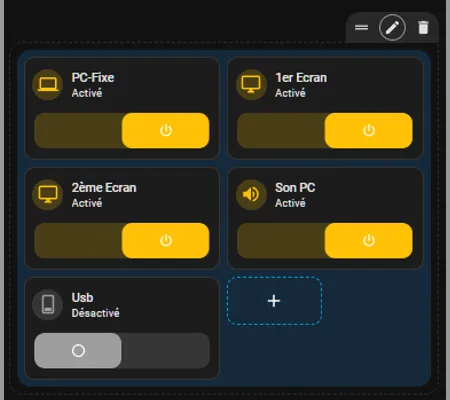
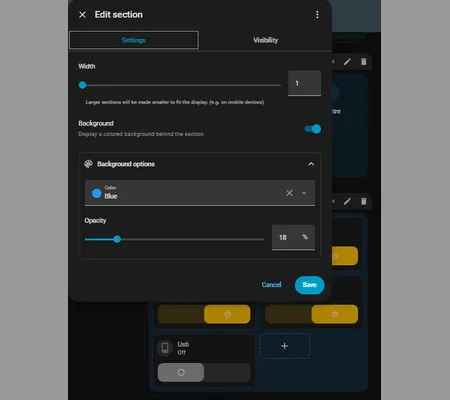
Since I use dark mode, I prefer lowering the opacity so the color remains subtle. This avoids overly saturated blocks and keeps the dashboard looking clean and elegant. Feel free to try different opacity values to find the look that suits you best.
The only slightly disappointing point is that you still can’t choose any color you want. Even though around twenty shades are available, it remains somewhat limited. I imagine Home Assistant will eventually offer a more flexible palette in a future version.
Favorites on your dashboard
This new feature is also very practical. It allows you to quickly access your preferred colors when controlling your smart lights. It’s especially useful if you often use the same tones or have recurring lighting moods. To use it, you can do:
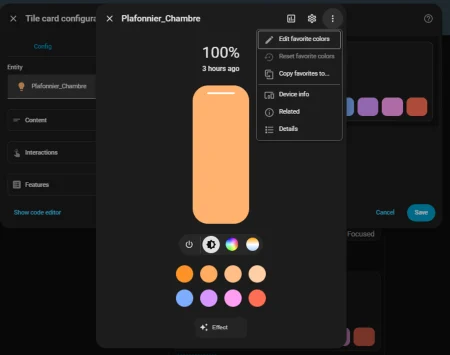
The only drawback is that configuring favorite colors isn’t very intuitive. I would have liked to define them directly in YAML to have more precise control, especially over exact values or opacity. For now, everything must be done through the interface, which lacks a bit of finesse.
I also thought I could replace my ambiance selector with this new feature, but unfortunately that’s not possible. My selector lets me configure all the lights in a room depending on what I’m doing (for example, when I watch a movie, all the living room lights automatically switch to specific colors and intensities). Favorite colors don’t allow this kind of logic. Maybe a similar feature will come in the future.
Infrared becomes a true first-class citizen in Home Assistant
I don’t have any infrared devices yet, but this new feature definitely makes me want to get some. Thanks to it, you can now interact with any device that uses an infrared remote: TVs, air conditioners, soundbars, fans, and many more.
The principle is simple: just like Bluetooth, Home Assistant uses ESPHome devices equipped with an infrared receiver as a proxy to capture and transmit signals. This opens the door to a much more natural integration of infrared within the ecosystem. For more details, you can check https://rc.home-assistant.io/blog/2026/04/01/release-20264/#infrared-becoming-a-first-class-citizen-of-home-assistant.
Purpose-specific automation triggers & conditions
Another interesting addition is that it’s now possible to use more natural triggers in automations, such as iOS triggers. This makes automations more accessible for users who don’t want to dive into complex configurations.
As for me, I don’t use Home Assistant’s built-in automations because I prefer more advanced graphical tools. I use Node-Red for all my automations, as it offers finer control and a more visual logic. This new feature simplifies automations for beginners, but I’ll continue building mine in Node-Red. If you want to learn more, you can check: https://rc.home-assistant.io/blog/2026/04/01/release-20264/#infrared-becoming-a-first-class-citizen-of-home-assistant.
Matter lock manager
I don’t have a Matter lock yet, but this new feature is very promising. It allows you to manage access rights much more precisely, for example by granting temporary access to a guest (like a delivery person). This makes smart locks more practical and more secure. I might end up buying one. For more information, you can check: https://rc.home-assistant.io/blog/2026/04/01/release-20264/#matter-lock-manager.
In conclusion, if you were hesitating to install this update, I can assure you it’s absolutely worth it. It brings real improvements to everyday use without adding complexity.
Comments
No comments yet.